Atlassian Forge · Cloud-native Gadget

Turn Jira data into executive-ready insight.

A premium dashboard gadget for Jira Cloud — engineered on Atlassian Forge to surface project health, sprint velocity, milestones, and risk signals through a single, sophisticated interface.
Free for teams up to 10 30-day free trial Forge-native · zero egress
Dashboards Rich Filters showing project health overview in Jira
Built on Atlassian Forge — runs in Atlassian's secure sandbox
Read-only scopes — your data never leaves Atlassian
Billed by Atlassian — single invoice, zero friction
The Product

Six dashboards. One unified view.

Each module is purposefully designed to answer a specific question your stakeholders ask — without leaving the Jira dashboard.

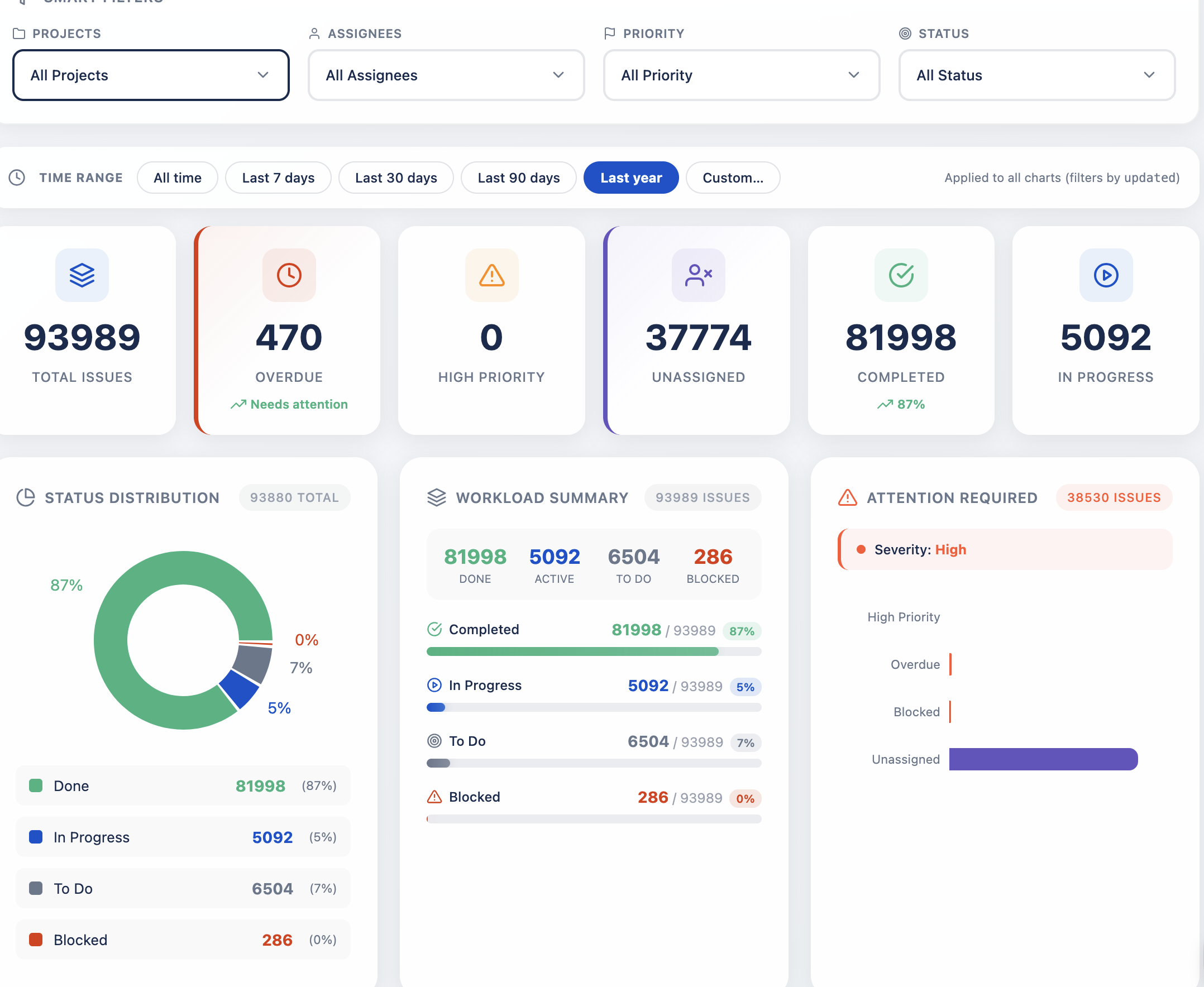
Project Health Dashboard view
— 01 / Health

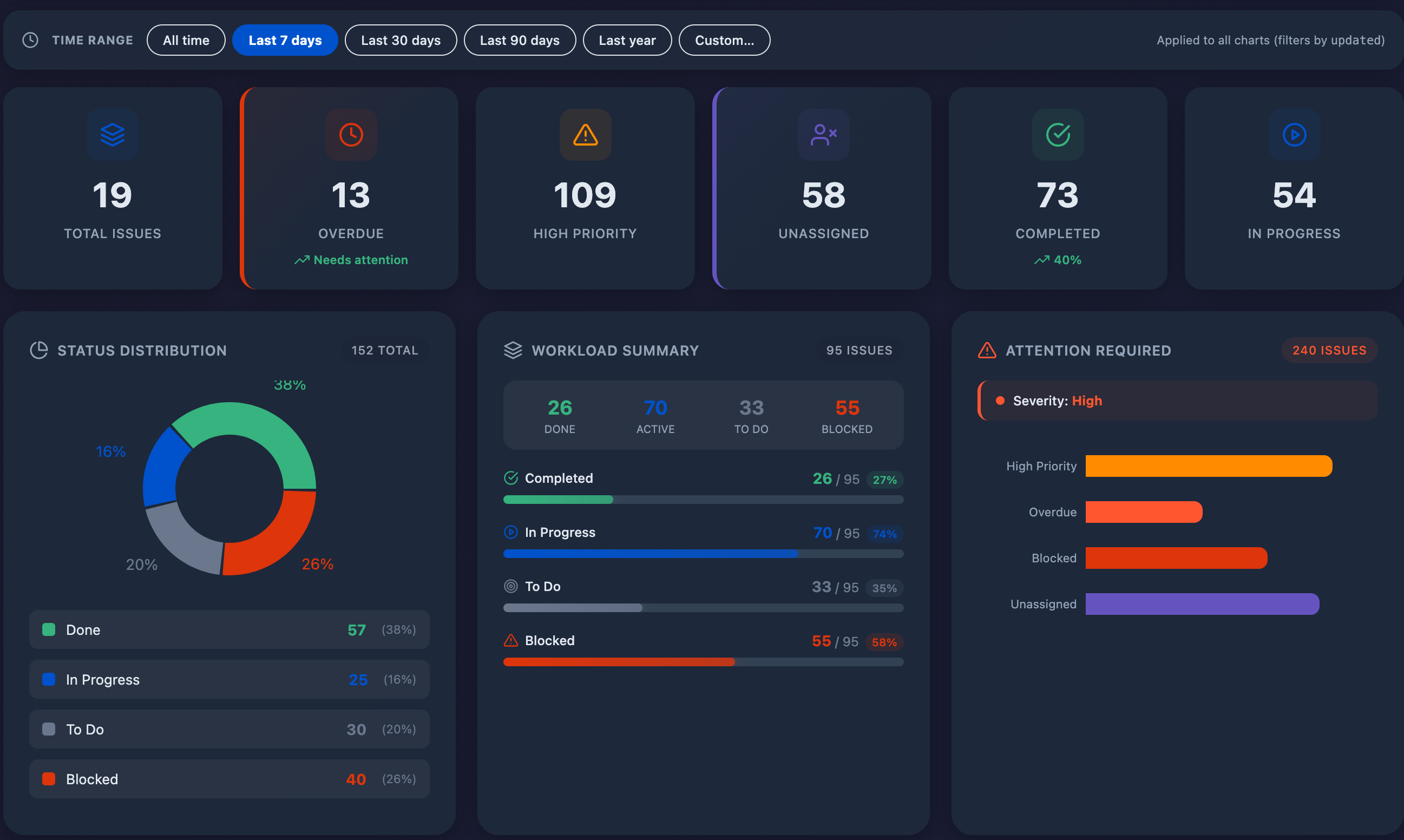
Project Health Dashboard

A single source of truth for the question every PM dreads: "Where do we actually stand?"

Aggregates completion rates, overdue items, blocked tickets, and unassigned work into a consolidated scorecard. Color-coded indicators surface what needs attention before the next stand-up — eliminating the manual JQL queries that drain twenty minutes from every status meeting.

Completion % Overdue tracking Blocker detection Workload signals
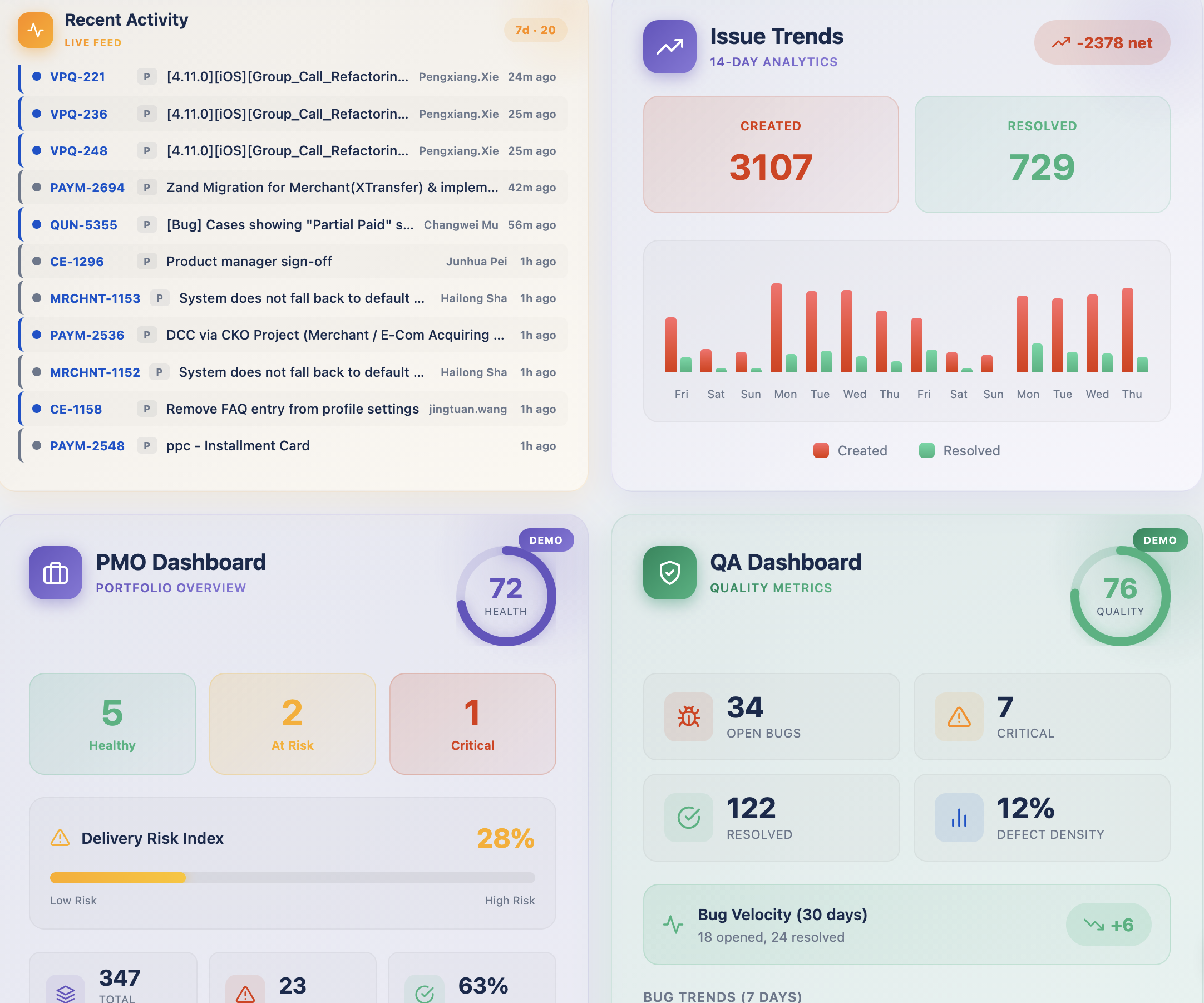
Portfolio overview dashboard
— 02 / Portfolio

Portfolio Overview for PMOs

When you steward ten projects, scrolling through ten Jira boards isn't a strategy — it's a tax.

Portfolio Overview rolls up multi-project status, resource allocation, and delivery pace into one consolidated panel. Drill from the portfolio view straight into the underlying issues with a single click — keeping leadership conversations focused on outcomes rather than ticket archaeology.

Multi-project rollup Click-through to issues PMO-ready
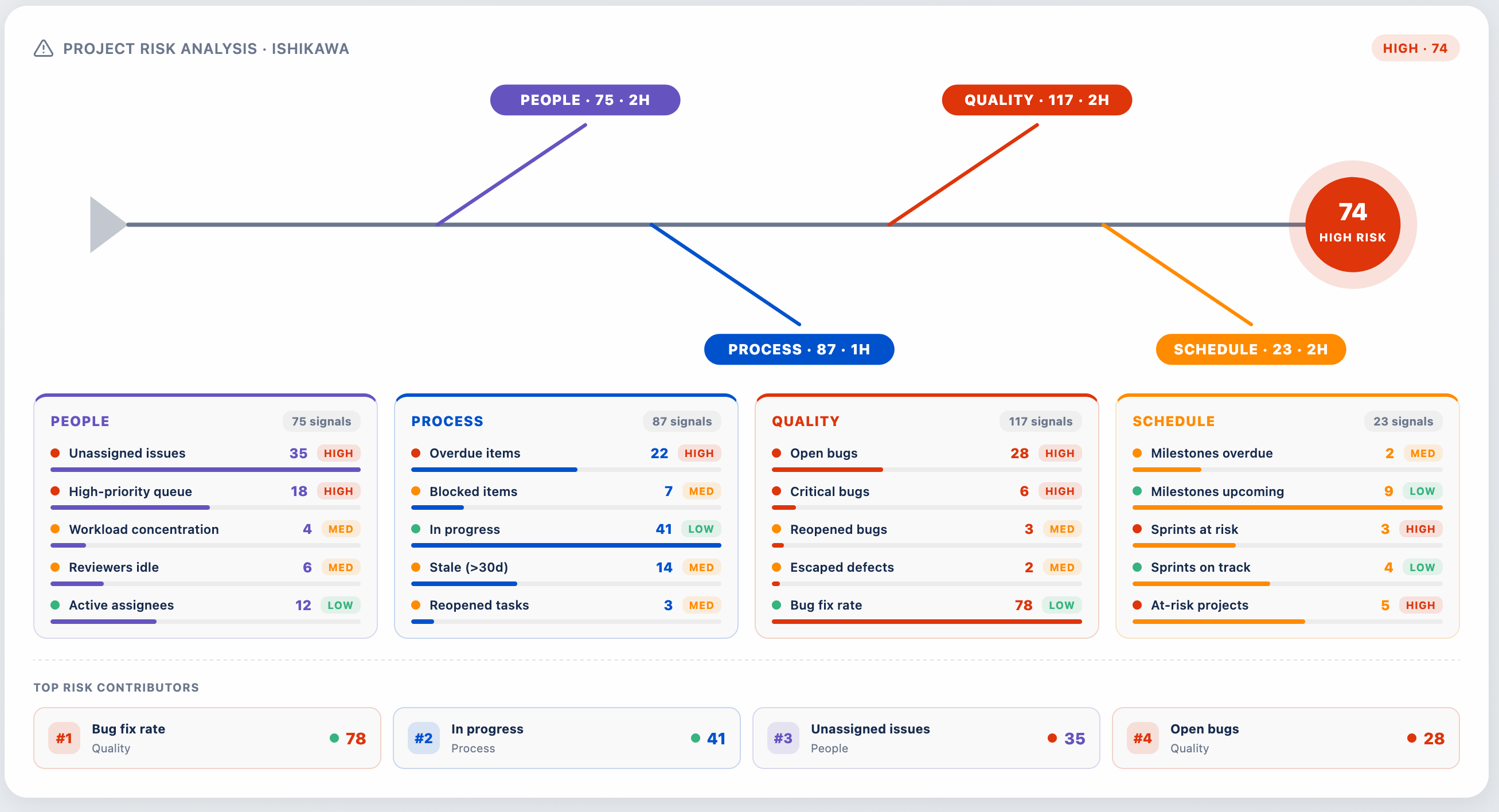
Ishikawa Risk Analysis fishbone diagram
— 03 / Risk

Risk Analysis · Ishikawa Diagram

A boardroom-grade fishbone for the risks hiding in your backlog.

Categorizes signals across People, Process, Quality, and Schedule — automatically derived from issue patterns such as bug fix rate, blocked items, and sprint slippage. The result is a visual conversation starter your engineering leads can take into a steering committee without rebuilding the slide.

Note: Risk analysis is provided as a reference tool and should be validated by project teams.

4M categorization Auto-aggregated signals Boardroom-ready
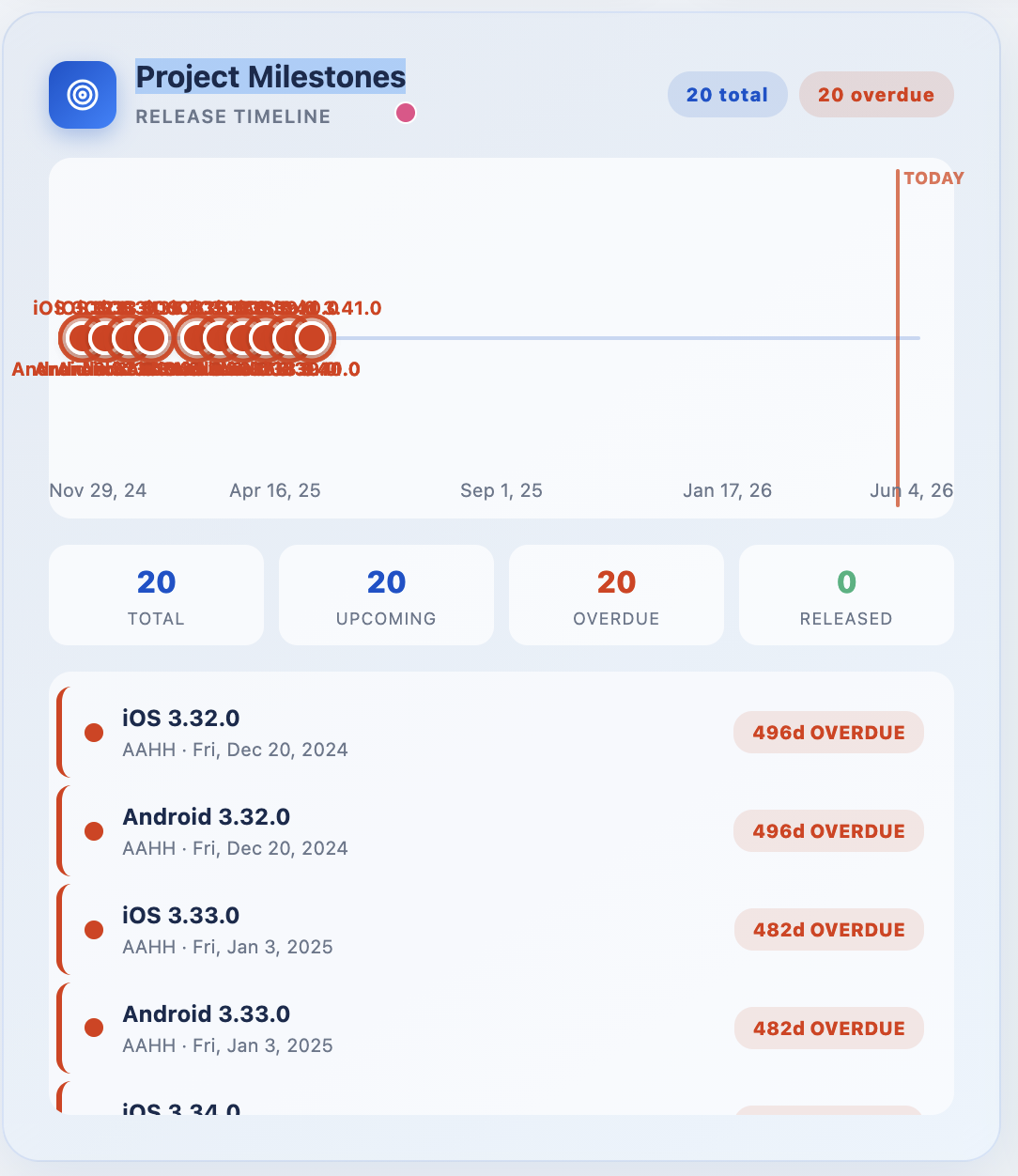
Project Milestones release timeline
— 04 / Milestones

Release Timeline & Milestones

Every release deserves a clear story arc — not a spreadsheet.

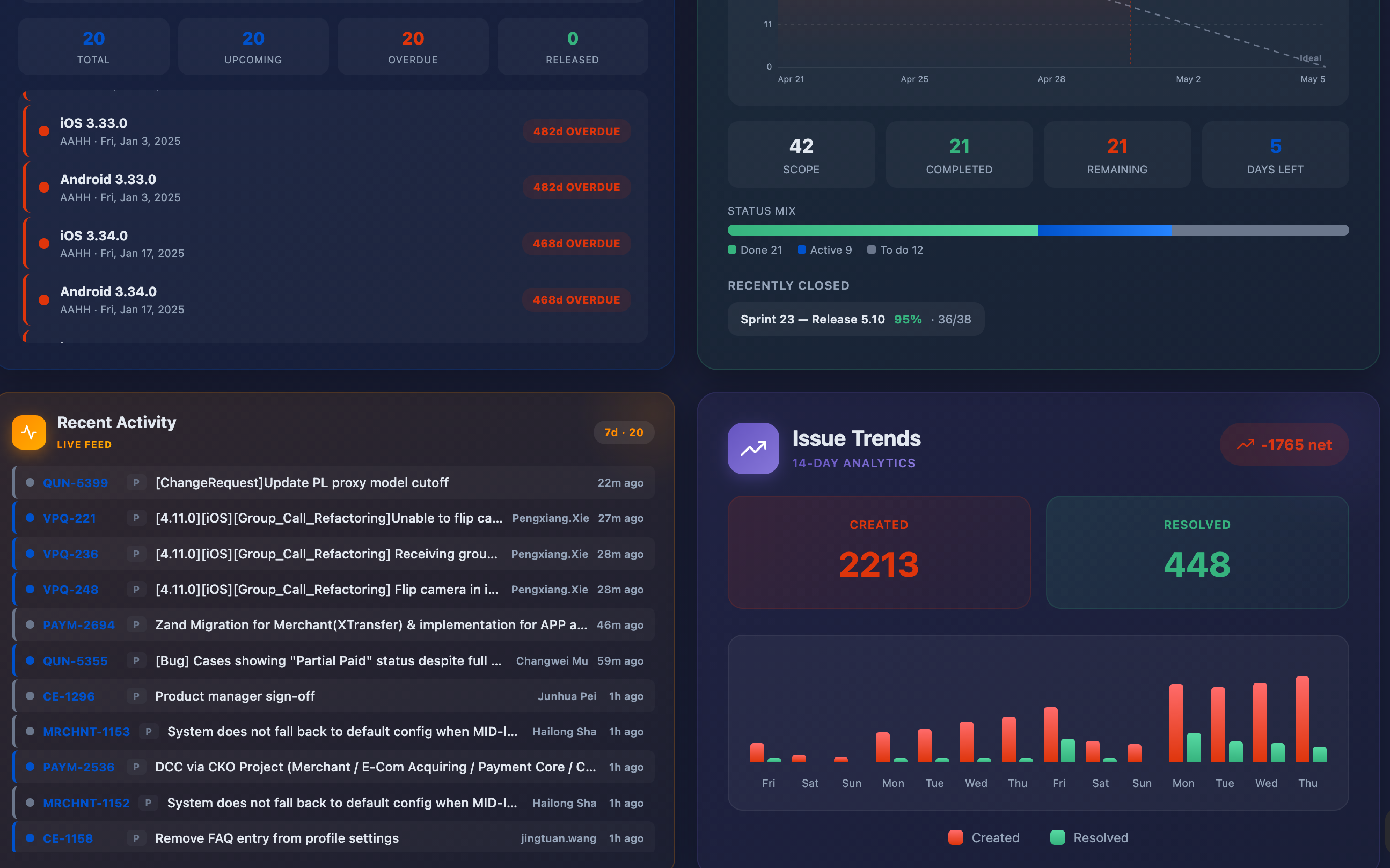
Visualizes upcoming, overdue, and released milestones along a chronological timeline anchored to today. Counters surface the totals that matter — 20 total · 20 upcoming · 20 overdue · 0 released — paired with a scrollable list of versions ready for grooming or executive review.

Timeline view Overdue surfacing Release-aware
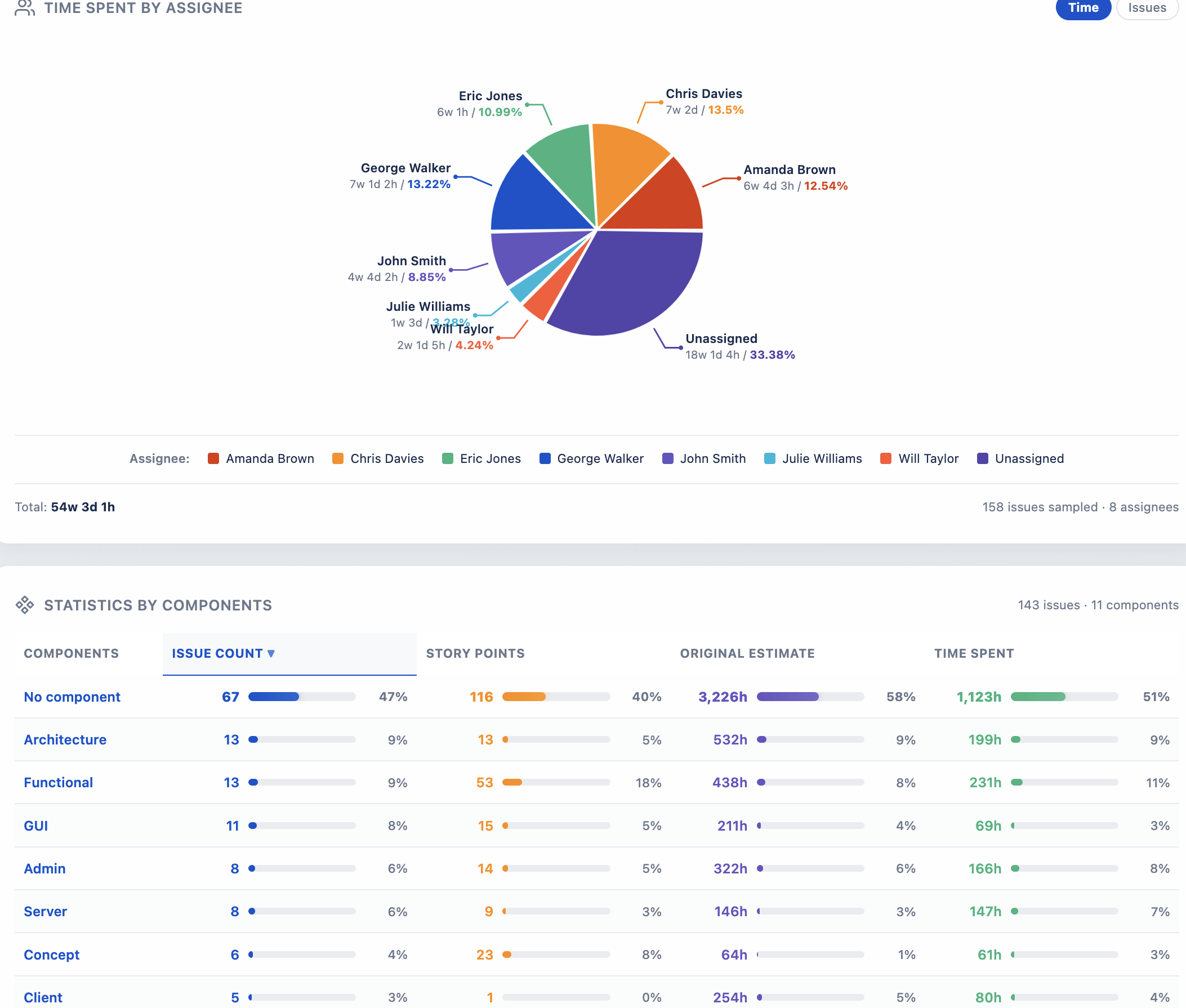
Statistics by Components breakdown
— 05 / Components

Statistics by Components

Workload concentration is the silent killer of velocity. Visualize it.

Decomposes your project into its component teams or modules, surfacing distribution across status, priority, and assignee in a single sortable matrix. Identify which corner of the codebase is carrying the load — and which is being neglected — long before retrospectives reveal it the hard way.

Component breakdown Workload signals Sortable matrix
Time Spent by Assignee distribution chart
— 06 / Effort

Time Spent by Assignee

Where the hours actually went — visualized in a single elegant chart.

Aggregates Jira worklogs by team member, exposing effort distribution across the people doing the work. Catch silent overload, surface unbilled time, and rebalance the next sprint with data instead of intuition. Filter by time range — last 7 days, 30 days, this quarter, or any custom window.

Worklog aggregation Per-assignee view Custom time ranges
The Engine

Rich filtering, applied everywhere.

A single filter panel powers every chart in the gadget — change one selection and every visualization re-renders in step.

Multi-Select Filters

Filter by projects, assignees, priorities, and statuses simultaneously. Selections compile to JQL automatically.

Cross-Chart Sync

Every chart on the dashboard shares the same filter state. One click updates the whole view.

Smart Time Ranges

Last 7 days, 30 days, 90 days, this year, or a custom date window — applied across every visualization.

Recent Activity Feed

Stay current with a chronological stream of issue updates, status changes, and team movement.

Issue Trends

Created vs. resolved over time — spot patterns, surface bottlenecks, and forecast outcomes earlier.

Sprint Progress

Active sprint burndown, story-point completion, and velocity trends in a compact, glanceable card.

🛡

Forge-Native Security

Runs in Atlassian's sandbox. Read-only scopes. No external egress. No customer data leaves Atlassian.

Demo Data Mode

Built-in demo data lets prospects and new admins see every chart light up instantly — no Jira setup required before evaluating.

Pricing

Simple per-user pricing. Free for small teams.

Volume discounts at every tier. Billed monthly through the Atlassian Marketplace alongside your other Cloud apps.

Users
Per user / month
Up to (USD / month)
Up to 10 users
Free
$0
11 – 100
$0.91
$91.00
101 – 250
$0.77
$206.50
251 – 1,000
$0.64
$686.50
1,001 – 2,500
$0.58
$1,556.50
2,501 – 5,000
$0.54
$2,906.50
5,001 – 7,500
$0.51
$4,181.50
7,501+
From $0.48
See Marketplace
All plans include a 30-day free trial · billed by Atlassian Marketplace · cancel anytime.
Final tier prices and exact breakpoints are shown on the Atlassian Marketplace app listing.

Bring clarity to your Jira dashboards.

Install Dashboards Rich Filters from the Atlassian Marketplace and try every feature free for 30 days — no credit card required.

FAQ

Frequently asked questions

Short, factual answers — also exposed as schema.org/FAQPage for Google AI Overview and assistants.

What is Dashboards Rich Filters?

Dashboards Rich Filters is a Jira Cloud dashboard gadget built on Atlassian Forge. It turns the standard Jira dashboard into an executive cockpit with multi-select rich filters, real-time KPIs, sprint burndown, Ishikawa (fishbone) risk analysis and PMO program-health insights.

Does it work on Jira Server or Data Center?

No. The app is Jira Cloud only because it is built on Atlassian Forge, which is a Cloud-only platform.

How is it priced?

Free for installations with up to 10 Jira users. Above that, a 30-day free trial applies, then per-user tiered pricing from $0.91/user/month at the 11–100 user tier, decreasing at higher tiers down to from $0.48 at the 7,501+ tier. Billing is handled through Atlassian.

What data does the app collect or send to third parties?

None. The app runs entirely on Atlassian-hosted Forge. It stores only an anonymous installation timestamp. No personal data is collected and no data is transmitted to third parties.

How do I draw an Ishikawa / fishbone diagram for a Jira project?

Install Dashboards Rich Filters from the Atlassian Marketplace and add the gadget to any Jira dashboard, or open the Rich Filters Dashboard entry under the Apps menu. The Risk Analysis section automatically categorises your Jira issues across People, Process, Quality and Schedule branches.

How does it compare to Rich Filters for Jira Dashboards (RVS)?

They are independent products from different vendors. Dashboards Rich Filters bundles native multi-select filtering with built-in analytics (KPIs, sprint burndown, Ishikawa risk diagram, milestones timeline) and a full-page Apps entry — features the RVS app does not provide.

Capabilities

Every chart, KPI and report in one Jira dashboard plugin

Dashboards Rich Filters is a complete Jira Cloud reporting suite for PMO, agile delivery and engineering leadership — built natively on Atlassian Forge so nothing leaves your tenant.

Rich filters

Multi-select filters for project, assignee, priority, sprint, status, label, component, epic, fix version and custom JQL. Filters cascade across every chart on the dashboard.

KPI tiles

Live counters for open / closed / overdue / blocked issues, bug-vs-story ratio, escaped defects, SLA breaches, release readiness and OKR progress.

Agile charts

Sprint burndown, velocity, cumulative flow (CFD), cycle time, lead time, throughput, and control chart — without leaving the Jira dashboard.

Risk & root cause

Ishikawa fishbone diagram auto-categorises Jira issues into People, Process, Quality and Schedule branches for retrospectives and PMO reviews.

Roadmap views

Milestone timeline, Gantt-style roadmap, workload heatmap and status distribution — give executives the program-health view they actually ask for.

Full-page view

A dedicated Apps → Rich Filters Dashboard entry gives executives a full-screen cockpit alongside the dashboard gadget.

Runs on Atlassian

100% Atlassian Forge — no external server, no database, no PII. A modern alternative to eazyBI, Custom Charts, RVS Rich Filters and Power BI connectors for Jira.

Built for

Project managers, PMO leads, scrum masters, delivery managers, engineering directors, release managers and Jira admins reporting upward.

Keywords this app helps with: Jira KPI dashboard, sprint burndown chart, velocity report, cumulative flow diagram, cycle time, lead time, throughput, Ishikawa fishbone, root cause analysis, risk register, milestone tracking, Gantt roadmap, workload heatmap, status distribution, priority breakdown, overdue issues, blocked issues, escaped defects, bug ratio, SLA, release readiness, OKR tracking, PMO reporting, portfolio dashboard, executive dashboard, agile reporting, scrum master tools, Forge app, Runs on Atlassian, eazyBI alternative, Custom Charts alternative, RVS Rich Filters alternative.